Showing posts with label C#. Show all posts

05 February 2017

Enum deserialization with Reflection

While you work on middleware integration applications, it quite common that the application being interacted are having different message exchange formats. Popular message exchange formats are XML & JSON.

Assume you are integrating an application which exposes data in XML format and you need send that data to another application which expects data to be sent in JSON.

So with XML de serilization you build an object and the object needs to de serialized into JSON text.

Problem statement

If your XSD has enumeration values with spaces, then upon generating the proxies, your .NET enum values will have XmlEnumAttribute applied to them.

Problem statemen example:

Let’s consider below XSD for LoanType enumeration.

<xs:element name=" LoanType" >
<xs:simpleType>
<xs:restriction base="xs:string">
<xs:enumeration value="Home Loan"/>
<xs:enumeration value="Student Loan"/>
<xs:enumeration value="Personal Loan"/>
<xs:enumeration value="Gold Loan"/>
</xs:restriction>
</xs:simpleType>
</xs:element>

Then upon generating the proxy classes the LoanType enum will look like below in C# .NET.

using System.Xml.Serialization;
public enum LoanType
    {
        [XmlEnumAttribute("Home Loan")]
        HomeLoan,

        [XmlEnumAttribute("Student Loan")]
        StudentLoan,

        [XmlEnumAttribute("Personal Loan")]
        PersonalLoan,

        [XmlEnumAttribute("Gold Loan")]
        GoldLoan
    }

If you use popular JOSN Serializer Newtonsoft.Json, then you will not get the exact values as defined XmlEnumAttribute in a more readable fashion.

The JSON de serialization text for LoanType will have either integer value(0, 1, 2, 3). This might not be acceptable for the receiving system. Then you need write custom logic in getting the XmlEnumAttribute values for enum values.

Solution to the problem

We can use Reflection to solve the problem here to get the XmlEnumAttribute for enum values. Something like below in C# .NET.

public static class ReflectionHelper
    {
        public static Dictionary<stringstring>  GetXmlEnumAttributeValues(IEnumerable<Type> forTypes)
        {
            IEnumerable<Type> enumTypes = GetEnumsFieldTypes(forTypes);

            Dictionary<stringstring> enumXmlEnumAttributeValues = new Dictionary<stringstring>();

            foreach (Type enumType in enumTypes)
            {
                MemberInfo[] memberInfos = 
           enumType.GetMembers
                 (BindingFlags.Public | BindingFlags.Static);
                foreach (MemberInfo memberInfo in memberInfos)
                {
            XmlEnumAttribute xmlEnumAttribute = 
              memberInfo.GetCustomAttributes
              (typeof(XmlEnumAttribute), false).FirstOrDefault() 
              as XmlEnumAttribute;
                    if (xmlEnumAttribute != null)
                    {
                        string keyName = enumType.FullName + memberInfo.Name;
                        if (!enumXmlEnumAttributeValues.ContainsKey(keyName))
                        {
                            enumXmlEnumAttributeValues.Add(keyName, xmlEnumAttribute.Name);
                        }
                    }
                }
            }

            return enumXmlEnumAttributeValues;
        }

private static IEnumerable<Type> GetEnumsFieldTypes
            (IEnumerable<Type> types)
        {
            List<Type> allEnumtypes = new List<Type>();
            foreach (Type type in types)
            {
                PropertyInfo[] propertyInfos = type.GetProperties();

                var enumTypes = from p in propertyInfos
                                where p.PropertyType.IsEnum
                                select p.PropertyType;

                allEnumtypes.AddRange(enumTypes);
            }

            return allEnumtypes;
        }
    }
private static Dictionary<stringstring> enumValues = 
ReflectionHelper.GetXmlEnumAttributeValues(new System.Collections.Generic.List<Type>{ typeof(Loan) });

   
private static string GetEnumText(Type enumtype, string value)
        {
            string keyName = enumtype.FullName + value;

            if (enumValues.ContainsKey(keyName))
            {
                value = enumValues[keyName];
            }
            return value;
        }

Then if you want to XmlEnumAttribute for a enum value, you can pass in the class type defining the enum. In this case it could be a "LoanType" type like below:

public class Loan
    {
        public LoanType LoanType; 
    }

Then when you have Loan object you can get its LoanType enum’s XmlEnumAttribute value like below:

Loan loan = new Loan() { LoanType = LoanType.HomeLoan };

string enumText = GetEnumText(typeof(LoanType), loan. LoanType);

Then enumText would have “Home Loan” instead of default JSON de searialized values of integer values.

02 July 2016

C# online compilers

Seldom there will be need to write a C# program without having access to Visual Studio. If that is your requirement you can find many online C# compilers in the internet.

A quick search on Google gives good number of C# online compilers.

Google search on "C# online compilers"

C# online compilers

However among them I liked tutorialspoint.com C# online compiler.

Pros

  • It is simple to use.
  • Accepts console inputs easily.
  • New projects starts with working sample of C# Console Project “Hello World”.
  • Also you can share your algorithm solution with your colleagues using tiny URL.

Cons

  • It doesn’t support intelligence.

Advantages of C# online compilers in General

Such C# online compilers are very helpful to prepare for online tests. Now a day’s most of the companies are using online platform tools to screen the interview candidates. Some of such online test platforms in the market are below:

15 August 2015

use of extension methods in data access code in C#

Already there are 2 articles posted on the blog about extension methods in C#. I'm writing one more on the same subject because extension methods can be used to reduce the number of lines of code to be written while improving the readability aspect of the code.

Earlier article on the extension methods

  1. Extension methods introduction and overview
  2. A practical example usage of extension methods in C#

Problem statement while writing repository code

Consider a scenario where you are writing repository code for saving customer details. The Customer Repository class usually will have Create, Read, Update and Delete methods(the typical CRUD operations).

public class CustomerRepository
{
  public void Create(Customer newCustomer)
  {
     //Other code...
     if (contact.Email != null)
       {
       sqlCommand.Parameters["@p_customer_email"].Value = 
               newCustomer.Email;
       }
    else
       {
      sqlCommand.Parameters["@p_customer_email"].Value =
                 DBNull.Value;
      }
   }
}

When new customer email is NULL and if you don't assign the Database specific NULL value(DBNull.Value), you are bound to get an EXCEPTION saying, missing parameter value or parameter value not provided for @p_customer_email while executing the stored procedures.(You will see this error only when in a stored procedure you have indicating @p_customer_email parameter as mandatory.)

To avoid such errors, you will end up in writing above NULL check for parameter value and assign DBNull.Value to SQL parameter when actual value is NULL.

But, when the number of such nullable parameter increases, the lines of code you have written also increases resulting in too much of duplicates lines of code. Now let's see, how this code duplication can be removed by using Extension methods.

Solution using extension methods

  1. Create a static helper class and add a extension method like below:
    namespace DBExtensions
    {
    public static class DBExtensions
     {
      public static object GetDatabaseValue(this string value)
        {
          if (value != null)
                    return value;

                return DBNull.Value;
        }
     }
    }
  2. Now in the customer repository class import the namespace in which DBExtensions class is defined
    using DBExtensions;
  3. Let's use the extension method added on the string class
    public class CustomerRepository
    {
      public void Create(Customer newCustomer)
      {
         //Other code...
         sqlCommand.Parameters["@p_customer_email"].Value =
         newCustomer.Email.GetDatabaseValue();
       }
    }

Advantage of extension methods

By using extension methods, the number of lines of code is reduced from 4 lines to just 1 line of code. Duplicated lines of code is reduced (Now code is inline with DRY principle). Also with the extension methods, code readability is improved.

19 July 2015

difference between throw and throw ex

Often times you might be wondering what is the difference between 'throw' and 'throw ex' statement when you see the C# code like below:

try
{
 // Do something
}
catch(Exception ex)
{
   // Log it
   throw;
}
And also look at the below code with throw ex:
try
{
 // Do something
}
catch(Exception ex)
{
   // Log it
   throw;
}

The difference is simple.

  • The 'throw' statement throws exception by including the original exception stack-trace
  • where as 'throw ex' statement throws the exception with the stack trace of its line of code execution; 'throw ex' will not include original exception stack-trace.

You can access exception Stack Trace using its string property 'StackTrace'.

Should the difference between 'throw' and 'throw ex' matters?

Yes, it matters. Let's take the below code to understand.

public class UserReposirity
{
 public static string GetUserType
                      (string userName) 
{
   string connectionString = 
   @"Data Source=LOCAL\SQLEXPRESS;Initial Catalog=Users;..;
   string  userType = null;
try
 {
    using (SqlConnection connection = 
          new SqlConnection(connectionString))
    {
      connection.Open();
      using(SqlCommand command = connection.CreateCommand())
      {
        command.CommandText = 
       "
SELECT Type FROM [dbo].[Users1] WHERE UserName=@userName";
       SqlParameter parameter =  command.CreateParameter();
        parameter.ParameterName = "
@userName";
        parameter.SqlDbType = System.Data.SqlDbType.VarChar;
        parameter.Value = userName;
        command.Parameters.Add(parameter);

       object result =  command.ExecuteScalar();
       if (result != null)
        {
         userType = result.ToString();
        }
       }
   }
  }
  catch (Exception ex)
  {
    // Log the exception
         throw;
     // throw ex;
   }

 return userType;
 }
}
class Program
 {
  static void Main(string[] args)
   {
     try
      {
         UserReposirity.GetUserType("ranga");
      }
      catch (Exception ex)
       {
         Console.WriteLine(ex.StackTrace);
       }
   }
 }

The first code snippet is a trivial code, a repository class trying to get the user type for the given user. The method catches the exception, log it and re-throw it.

The second code snippet is invoking the repository method. Calling the DB method is wrapped inside a try-catch block. In the catch block its printing the exception stack trace.

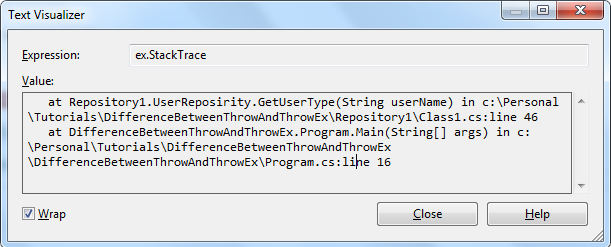
StackTrace with 'throw' statement

Now we have set the stage to understand the practical difference between 'throw' and 'throw ex'. Let's run the code AS IS, i.e., by using the throw statement inside the repository method catch block. Let's break the SQL Connection before running the code, so that it will lead to an exception. Look at the below stacks trace, it shows the stack trace of the original exception as well.

Original exception StackStrace carried with throw statement

StackTrace with 'throw ex' statement

Now modify the code in the repository method catch block to use the 'throw ex' statement and run the app. This time you will see the below Exception StackTrace. Note, it doesn't include the original exception's stack trace.

Original exception StackStrace doesn't carried with throw ex statement

Where to use 'throw ex' over 'throw'

When you think exception stacks trace give away confidential information, then use throw ex. Especially when you are writing public repository methods and also when you throwing exceptions from service layer.

You don't want to give away the information about the database you are using and the libraries you are using to consumers of your services. Because hackers are around. By looking at the Stack Trace, bad guys will make out certain things, which you may not be comfortable in giving away.

Hope you understood the difference between throw and throw ex and also when to use what over the other. Feel free to comment on the post.

19 May 2015

generic delegates in c#.net

We have always declared delegates in by using the below signature.

delegate void Process(int input1, int input2);
Process processDelegate = new Process(ProcessTask);

There is nothing wrong in defining the delegates like above, except when you need to define so many such delegates. Then you will realize the pain of declaring so many such delegates.

Delegates are just function pointers, so defining like above matching method signature can be eliminated by using generic delegates.

Using generic delegate you can save on delegate definition like below:

Action<intint> processDelegate = ProcessTask;

So using generic delegates is simple and it eliminates the need for defining the delegates separately. Going further there are 3 different types of generic delegates:

  1. Func delegates
  2. Action delegates
  3. Predicate delegates

Let’s go one by one.

Func delegates

Func generic delegates are a delegate to a method which accepts zero to sixteen parameters and returns a value always.

public delegate TResult Func<T, TResult>(T arg);

The func delegates can be a delegate to a method accepting up to 16 input parameters and returns a value.

Func delegate example in C#.NET:
public  long ProcessTask(int 1 input1, int input2)
{
}
Func <intintlong> funcDelegate = ProcessTask;
long result = funcDelegate(1,2);

Action delegates

Action delegates can be a delegate to a method accepting up to 16 input parameters and returning no value. Action generic delegates are similar to Func delegates expect that they don’t return any value. Action delegate return type is always void.

public delegate void Action<in T1, in T2>(T1 arg1, T2 arg2);
Action delegate example in C#.NET:
public void ProcessTask(int 1 input1, int input2)
{
}
Func <intint> actionDelegate = ProcessTask;
actionDelegate(1, 2);

Predicate delegates

Predicates can be delegates to a method accepting a parameter and retuning a Boolean value.

public delegate bool Predicate<in T>(T obj);

Predicate are extensively used in a lambda expression to filter the results. In the below example, predicates are used to get the list of managers from the employee list.

Predicate<Employee> managerFinder= 
   (Employee e) => 
      {
         return e.Designation == "Manager"
      };